Business · DIGITAL DOWNLOAD
LIFE & PLANNING · DIGITAL DOWNLOAD
YOUR ENTIRE MAGICAL PRACTICE. FINALLY ORGANIZED. The Witch’s Year 2027 is a premium 2027 Witch Planner & Digital Grimoire built as a real interactive br…
Checkout, payment and instant-download delivery are completed securely on Etsy.
DESIGNED FOR REAL LIFE
Everything you need to understand what is included, how it works and whether it is the right fit for your planning style.
YOUR ENTIRE MAGICAL PRACTICE. FINALLY ORGANIZED.
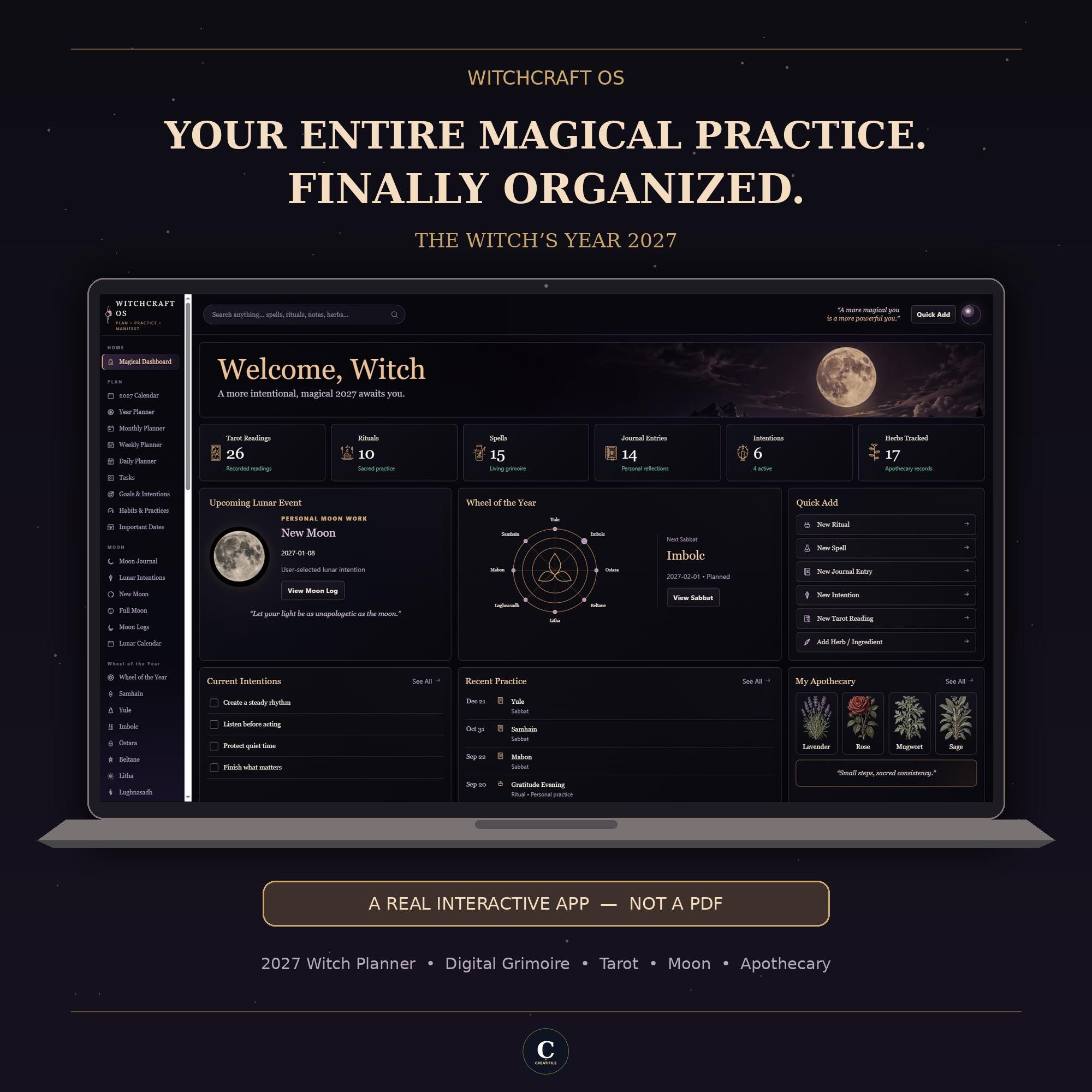
The Witch’s Year 2027 is a premium 2027 Witch Planner & Digital Grimoire built as a real interactive browser app — not a printable PDF, GoodNotes planner, or Notion template.
Plan your year, build your personal grimoire, record Tarot readings, organize Moon and Sabbat practices, manage your apothecary, journal your reflections, search across your records, and keep your magical practice together in one beautifully organized system.
No GoodNotes
No Notion
No Account
No Subscription
✦ TRY THE LIVE DEMO BEFORE YOU BUY
Open the Witchcraft OS Live Demo
The demo is designed for exploring the Witchcraft OS experience. Your purchased version is your own working copy for managing your personal records.
✦ A REAL INTERACTIVE APP — NOT A PDF
Instead of writing on static planner pages, Witchcraft OS gives you an actual interactive workspace where you can:
Create
Edit
Organize
Search
Connect
Archive
Backup
Your saved records are stored locally in your browser.
Core functionality works locally without requiring a CreatiFile account or recurring subscription.
✦ PLAN YOUR MAGICAL 2027
2027 Calendar
Year Planner
Monthly Planner
Weekly Planner
Daily Planner
Tasks
Goals & Intentions
Habits & Practices
Important Dates
Plan the practical parts of your year alongside the practice that gives it meaning.
✦ MOON & LUNAR PRACTICE
Moon Journal
Lunar Intentions
New Moon Workspace
Full Moon Workspace
Moon Logs
Lunar Calendar
Record dates, intentions, reflections, and personal Moon work in one dedicated area.
Please note: Witchcraft OS is designed for recording and organizing your lunar practice. It is not a live astronomical Moon-phase calculator.
✦ WHEEL OF THE YEAR
Samhain
Yule
Imbolc
Ostara
Beltane
Litha
Lughnasadh
Mabon
Use the visual Wheel of the Year together with dedicated Sabbat workspaces to organize dates, plans, notes, and personal reflections.
✦ BUILD YOUR LIVING GRIMOIRE
Create a grimoire that can grow with your practice.
Spells
Rituals
Correspondences
Recipes
Personal Notes
Unlike a fixed printable, your records remain editable, searchable, and organized inside your Witchcraft OS.
✦ TAROT & DIVINATION
Tarot Readings
Tarot Spreads
Oracle Readings
Deck Collection
Reading Insights
Record readings, cards, spreads, decks, notes, and your own interpretations so you can revisit your practice over time.
✦ JOURNAL & INNER WORK
Personal Journal
Dream Journal
Manifestations
Gratitude
Reflections
Keep your personal reflections alongside the rest of your practice without scattering them across separate planners and notebooks.
✦ ORGANIZE YOUR APOTHECARY
Herbs
Crystals
Candles
Oils
Incense
Supplies
Quantity
Unit
Storage Location
Source
Acquisition Date
Cost
Reorder Threshold
A dedicated Low Stock view helps you identify supplies that may need your attention.
✦ YOUR PRACTICE — CONNECTED
Witchcraft OS goes beyond separate digital planner pages.
Global Search
Magical Timeline
Insights
Connected Records
Archives
Search useful information across the OS, revisit your practice chronologically, connect related records, and restore archived information when needed.
✦ PERSONALIZE YOUR WITCHCRAFT OS
Make the workspace feel more like your own.
Multiple visual themes
Comfortable or compact layout density
Sunday or Monday week start
Reduced Motion option
Customizable visible modules
Optional display name
Backup reminders
Hide modules you don't need without deleting their underlying records.
✦ PRIVATE, LOCAL DATA
Your saved working records are stored locally in your browser rather than in a CreatiFile cloud account.
No CreatiFile Account
No Subscription
No Cloud Sync Required
Because working data is local to the browser/device you use, regular backups are strongly recommended.
✦ BACKUP & RESTORE
Your practice should not depend on one browser-storage copy.
Witchcraft OS includes built-in JSON Backup & Restore functionality.
Create downloadable backups of your records and restore compatible Witchcraft OS backup data when needed.
✦ DEMO DATA INCLUDED
You don't have to start by staring at an empty system.
Illustrative demo records are included to help you understand how different parts of Witchcraft OS work together.
REMOVE DEMO DATA
control to clear the included demo records while preserving your personal records.
✦ USER GUIDE INCLUDED
Your purchase also includes a dedicated Witchcraft OS User Guide to help you understand and use the system.
The guide is designed to help you get started, navigate the different sections, understand the main features, manage your records, and use the app with greater confidence.
So even if you've never used a browser-based interactive planner before, you'll have a reference available as you learn the system.
✦ WHAT YOU RECEIVE
1 × CreatiFile Witchcraft OS — The Witch’s Year 2027
Interactive browser-based application
1 × Witchcraft OS User Guide
Getting-started and feature guidance
Built-in Demo Data
For exploring the system before adding your own records
Built-in Backup & Restore Tools
This is a DIGITAL PRODUCT ONLY.
No physical planner, book, binder, or other physical item will be shipped.
✦ HOW IT WORKS
Purchase the listing.
Download the supplied digital package from Etsy.
Extract the ZIP file if your download is supplied as a compressed package.
Read the included User Guide.
Open the Witchcraft OS HTML file in a compatible modern web browser.
Explore the included demo records.
Remove demo data whenever you're ready to begin.
Start creating your own records.
Create regular backups from Backup & Data.
No traditional software installation.
No GoodNotes.
No Notion.
No CreatiFile account.
No recurring subscription.
✦ BEFORE YOU BUY
Use the live demo: https://witchcraftoslivedemo.vercel.app/
Explore Witchcraft OS Live Demo
This is the easiest way to experience the interface and understand how Witchcraft OS differs from a conventional printable or digital PDF planner.
FAQ
No. Witchcraft OS is an interactive browser-based application. You can create, edit, organize, search, archive, connect, and back up records rather than simply writing on static PDF pages.
No. GoodNotes is not required.
No. Witchcraft OS does not require Notion.
No CreatiFile account or recurring subscription is required.
Your saved working records are stored locally in the browser you use. They are not automatically synchronized between devices.
Yes. Witchcraft OS includes built-in JSON Backup & Restore functionality. We strongly recommend creating regular backups.
No. The Moon features are designed for recording and organizing your personal lunar practice and dated Moon records. Witchcraft OS should not be treated as a live astronomical Moon-phase calculator.
Samhain, Yule, Imbolc, Ostara, Beltane, Litha, Lughnasadh, and Mabon.
Yes. The app includes a dedicated Remove Demo Data control.
Yes. A dedicated Witchcraft OS User Guide is included with your purchase to help you get started and understand the system.
Witchcraft OS Live Demo
No. Witchcraft OS is a responsive browser-based application, not an App Store or Google Play native app.
No automatic cloud synchronization is provided. Your working data is local to the browser/device you use. Use the built-in Backup & Restore system when you need a portable copy of your data.
This listing is for a digital product only. Nothing physical will be mailed.
Because this is browser-based software rather than a standard printable planner, please review the listing images, product description, compatibility information, and live demo before purchasing.
Witchcraft OS is an organizational and journaling tool. It does not provide medical advice, guaranteed spiritual outcomes, deterministic divination, financial predictions, or other guaranteed results.
CREATIFILE WITCHCRAFT OS
THE WITCH’S YEAR 2027
YOUR ENTIRE MAGICAL PRACTICE. FINALLY ORGANIZED.
PLAN
PRACTICE
MANIFEST
MORE FROM CREATIFILE
Business · DIGITAL DOWNLOAD
Life & Planning · DIGITAL DOWNLOAD
Life & Planning · DIGITAL DOWNLOAD